

Microsoft said on November 17, 2026 that Windows 11 Administrator Protection is generally available. That announcement may prompt a practical question for someone considering a refurbished computer: do you need a new PC to use it? No new model is required simply because of this feature. Microsoft lists it for supported Windows 11 devices running Home, Pro, Enterprise, or Education. The important checks are whether the particular computer is officially supported for Windows 11, has the applicable updates, and can use the feature in the way you expect.
What Administrator Protection does
Windows has long shown User Account Control prompts when software requests permission to make system-level changes. Administrator Protection changes how an administrator account operates between those prompts. Instead of keeping broad administrator privileges available to its ordinary session, Windows runs the user with reduced privileges by default. When a task needs elevation, the user explicitly authorizes it. Windows then creates a separate, temporary elevated context for that task and discards it afterward.
Microsoft describes Windows Hello identity verification as part of this approval process. Examples of tasks that may need approval include installing certain software and changing protected system settings. The feature is intended to reduce the opportunity for an app or malware running in the ordinary session to gain persistent administrative access. It is an additional control, not a substitute for updates, backups, careful downloads, or a properly configured account. Microsoft's technical overview explains the design in more detail.
Does a refurbished Windows 11 PC qualify?
Microsoft's stated scope is supported Windows 11 devices, not only PCs sold after the November announcement. The supported editions include Home, Pro, Enterprise, and Education. A refurbished laptop running an officially supported Windows 11 installation can therefore be a candidate. A PC that runs Windows 11 only because its compatibility checks were bypassed should not be assumed to receive the same support or feature behaviour.
This distinction is more useful than the age printed in a listing. A newer-looking computer might have an unsupported processor or a modified installation. An older business laptop might be eligible if its exact processor and firmware meet Microsoft's requirements. Our Windows 11 compatibility guide for used laptops covers the processor, TPM, Secure Boot, and edition checks that should come before choosing a machine for any new Windows 11 feature.
There is no separate requirement in Microsoft's Administrator Protection overview to buy a Copilot+ PC or a computer with a dedicated AI processor. Do not use the feature announcement as a reason by itself to replace an otherwise suitable, supported Windows 11 laptop. The same conclusion does not apply to every other Windows feature: each feature can have its own hardware and regional requirements.
Available does not mean enabled everywhere
Microsoft says Administrator Protection is available with update KB5120998, but it is off by default for ordinary devices. Microsoft also says the Windows Security control for enabling it is being introduced gradually. As of November 2026, the absence of the toggle on an otherwise eligible PC is not by itself proof that the hardware is too old. Check the installed Windows version and current updates, then consult Microsoft's current documentation rather than assuming a screenshot in an article matches every installation.
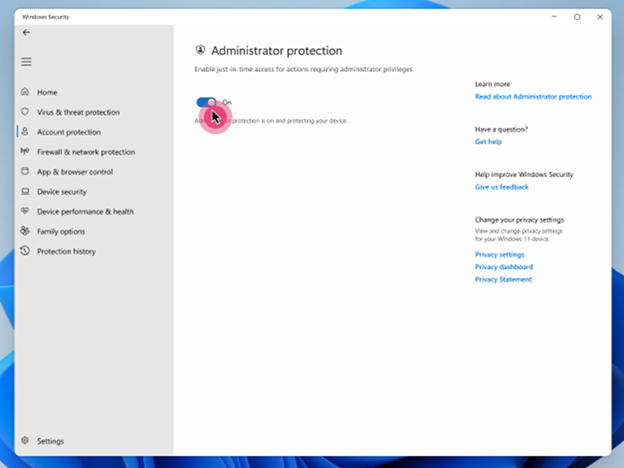
For an individual PC on which the control is present, Microsoft directs users to open Windows Security > Account protection, turn on Administrator Protection, and restart. A restart is required before the change takes effect. On a managed work or school computer, an administrator may instead control it through policy. In organizations using Microsoft's security baselines, the setting may be enabled by the baseline even though a consumer machine would leave it off. A used PC should be released from any former organization's management before a private buyer relies on its settings.
The phrase "generally available" describes the feature's release status. It is not a promise that every refurbished PC already has the same visible switch, that the feature is turned on automatically, or that every application works unchanged when it is enabled. Our guide to the Windows 11 2026 update on refurbished PCs explains why a current supported installation and a completed update history should be checked separately from a listing's broad "Windows 11" label.
What changes in everyday use?
For ordinary browsing, email, documents, and video calls, Administrator Protection is not intended to change the basic Windows desktop. Its effect becomes visible when a program asks to do something with elevated privileges. You should expect an explicit approval step rather than an application quietly keeping an administrator token for longer than necessary. This may be most noticeable during software installation, driver setup, or changes to system-wide settings.
The approval prompt should not become a habit of clicking through without reading it. If a program unexpectedly asks for elevation, stop and confirm that you initiated the action and trust the program. The feature reduces one class of risk, but approving an untrusted installer can still allow harmful changes. Similarly, it does not make an unsupported operating system secure or remove the need to install monthly security updates.
Compatibility trade-offs to check
Microsoft notes that some applications assume the ordinary and elevated sessions share the same profile and resources. With Administrator Protection, that assumption may fail. An elevated app might not inherit a network drive, single sign-on session, or settings from the unelevated account. Microsoft specifically cautions against enabling the feature on Windows 365 Cloud PCs, Azure Virtual Desktop session hosts, devices that require Hyper-V, and some setups using shared files across profiles or Local Administrator Password Solution. Those are specialized environments, but they illustrate why a business buyer should test required software before rolling the setting out broadly.
For a home buyer, make a short list of software that needs administrator rights: a printer utility, a game launcher with drivers, a development tool, or a VPN client, for example. A program that installs and runs as a standard user is less likely to be affected by the new elevation boundary. If your work depends on a particular application, check its vendor guidance and test it after enabling the feature. Microsoft documents current troubleshooting notes in the same Administrator Protection page; review them again when the PC is configured, because fixes and limitations can change.
Questions to ask before buying
- What is the exact model, processor, and installed Windows 11 edition and version?
- Is this an officially supported Windows 11 installation, without a hardware-eligibility workaround?
- Have recent Windows security updates installed successfully, and is the device still receiving updates?
- Is the computer free of a previous employer's or school's management policies and accounts?
- Does your required software work when administrator elevation is isolated and approved each time?
A seller does not need to advertise Administrator Protection as an included feature for a PC to be worth considering. The more useful evidence is a clean, supported Windows installation, accurate hardware details, and a machine you can set up under your own account. If the Windows Security toggle has not yet appeared, treat that as a rollout question to verify later rather than as a reason to assume the device is obsolete.
The buying conclusion
Administrator Protection is a Windows 11 security feature, not a new-PC purchasing requirement. A supported refurbished PC can be suitable, provided its installation and updates are in order. Microsoft has released the feature, but it remains off by default in ordinary setups and the consumer-facing control is arriving gradually. Buy on the basis of the device's verified Windows support, condition, and ability to run your actual software, then decide whether and when to enable the additional protection.